📄 English | 中文

𝚃𝚎𝚡𝚃𝚎𝚕𝚕𝚎𝚛

[![](https://img.shields.io/badge/API-Docs-orange.svg?logo=read-the-docs)](https://oleehyo.github.io/TexTeller/) [![arXiv](https://img.shields.io/badge/arXiv-2508.09200-b31b1b.svg?logo=arxiv&logoColor=white)](https://arxiv.org/abs/2508.09220) [![](https://img.shields.io/badge/Data-Texteller3.0-brightgreen.svg?logo=huggingface)](https://huggingface.co/datasets/OleehyO/latex-formulas-80M) [![](https://img.shields.io/badge/Weights-Texteller3.0-yellow.svg?logo=huggingface)](https://huggingface.co/OleehyO/TexTeller) [![](https://img.shields.io/badge/docker-pull-green.svg?logo=docker)](https://hub.docker.com/r/oleehyo/texteller) [![](https://img.shields.io/badge/License-Apache_2.0-blue.svg?logo=github)](https://opensource.org/licenses/Apache-2.0)



https://github.com/OleehyO/TexTeller/assets/56267907/532d1471-a72e-4960-9677-ec6c19db289f TexTeller is an end-to-end formula recognition model, capable of converting images into corresponding LaTeX formulas. TexTeller was trained with **80M image-formula pairs** (previous dataset can be obtained [here](https://huggingface.co/datasets/OleehyO/latex-formulas)), compared to [LaTeX-OCR](https://github.com/lukas-blecher/LaTeX-OCR) which used a 100K dataset, TexTeller has **stronger generalization abilities** and **higher accuracy**, covering most use cases. >[!NOTE] > If you would like to provide feedback or suggestions for this project, feel free to start a discussion in the [Discussions section](https://github.com/OleehyO/TexTeller/discussions). ---
## 🔖 Table of Contents - [Getting Started](#-getting-started) - [Web Demo](#-web-demo) - [Server](#-server) - [Python API](#-python-api) - [Formula Detection](#-formula-detection) - [Training](#️️-training)

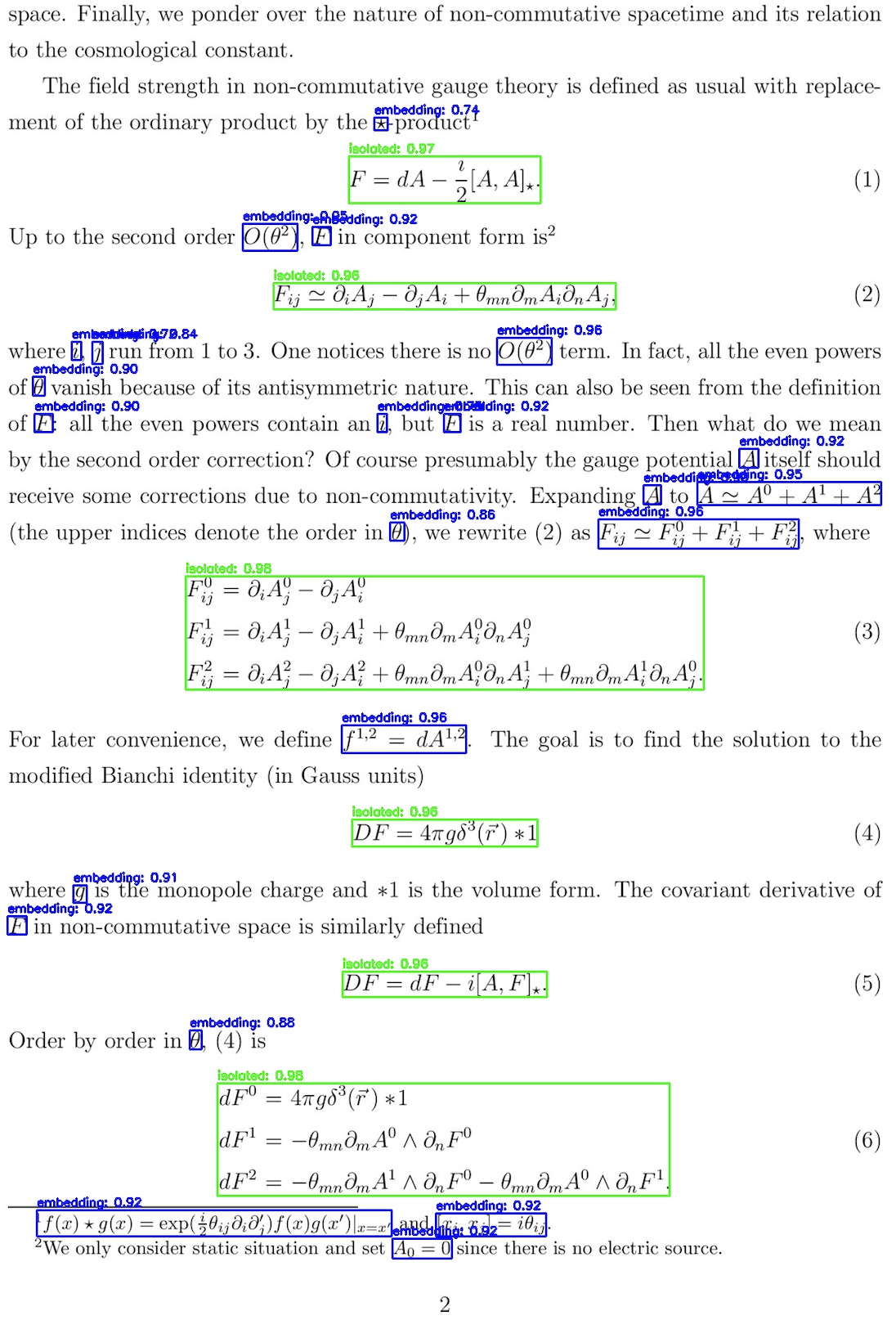
Images that can be recognized by TexTeller

## 📮 Change Log - [2025-08-15] We have published the [technical report](https://arxiv.org/abs/2508.09220) of TexTeller. The model evaluated on the Benchmark (which was trained from scratch and had its handwritten subset filtered based on the test set) is available at https://huggingface.co/OleehyO/TexTeller_en. **Please do not directly use the open-source version of TexTeller3.0 to reproduce the experimental results of handwritten formulas**, as this model includes the test sets of these benchmarks. - [2025-08-15] We have open-sourced the [training dataset](https://huggingface.co/datasets/OleehyO/latex-formulas-80M) of TexTeller 3.0. Please note that the handwritten* subset of this dataset is collected from existing open-source handwritten datasets (including both training and test sets). If you need to use the handwritten* subset for your experimental ablation, please filter the test labels first. - [2024-06-06] **TexTeller3.0 released!** The training data has been increased to **80M** (**10x more than** TexTeller2.0 and also improved in data diversity). TexTeller3.0's new features: - Support scanned image, handwritten formulas, English(Chinese) mixed formulas. - OCR abilities in both Chinese and English for printed images. - [2024-05-02] Support **paragraph recognition**. - [2024-04-12] **Formula detection model** released! - [2024-03-25] TexTeller2.0 released! The training data for TexTeller2.0 has been increased to 7.5M (15x more than TexTeller1.0 and also improved in data quality). The trained TexTeller2.0 demonstrated **superior performance** in the test set, especially in recognizing rare symbols, complex multi-line formulas, and matrices. > [Here](./assets/test.pdf) are more test images and a horizontal comparison of various recognition models. ## 🚀 Getting Started 1. Install uv: ```bash pip install uv ``` 2. Install the project's dependencies: ```bash uv pip install texteller ``` 3. If your are using CUDA backend, you may need to install `onnxruntime-gpu`: ```bash uv pip install texteller[onnxruntime-gpu] ``` 4. Run the following command to start inference: ```bash texteller inference "/path/to/image.{jpg,png}" ``` > See `texteller inference --help` for more details ## 🌐 Web Demo Run the following command: ```bash texteller web ``` Enter `http://localhost:8501` in a browser to view the web demo. > [!NOTE] > Paragraph recognition cannot restore the structure of a document, it can only recognize its content. ## 🖥️ Server We use [ray serve](https://github.com/ray-project/ray) to provide an API server for TexTeller. To start the server, run the following command: ```bash texteller launch ``` | Parameter | Description | | --------- | -------- | | `-ckpt` | The path to the weights file,*default is TexTeller's pretrained weights*. | | `-tknz` | The path to the tokenizer,*default is TexTeller's tokenizer*. | | `-p` | The server's service port,*default is 8000*. | | `--num-replicas` | The number of service replicas to run on the server,*default is 1 replica*. You can use more replicas to achieve greater throughput.| | `--ncpu-per-replica` | The number of CPU cores used per service replica,*default is 1*.| | `--ngpu-per-replica` | The number of GPUs used per service replica,*default is 1*. You can set this value between 0 and 1 to run multiple service replicas on one GPU to share the GPU, thereby improving GPU utilization. (Note, if --num_replicas is 2, --ngpu_per_replica is 0.7, then 2 GPUs must be available) | | `--num-beams` | The number of beams for beam search,*default is 1*. | | `--use-onnx` | Perform inference using Onnx Runtime, *disabled by default* | To send requests to the server: ```python # client_demo.py import requests server_url = "http://127.0.0.1:8000/predict" img_path = "/path/to/your/image" with open(img_path, 'rb') as img: files = {'img': img} response = requests.post(server_url, files=files) print(response.text) ``` ## 🐍 Python API We provide several easy-to-use Python APIs for formula OCR scenarios. Please refer to our [documentation](https://oleehyo.github.io/TexTeller/) to learn about the corresponding API interfaces and usage. ## 🔍 Formula Detection TexTeller's formula detection model is trained on 3,415 images of Chinese materials and 8,272 images from the [IBEM dataset](https://zenodo.org/records/4757865).
We provide a formula detection interface in the Python API. Please refer to our [API documentation](https://oleehyo.github.io/TexTeller/) for more details. ## 🏋️‍♂️ Training Please setup your environment before training: 1. Install the dependencies for training: ```bash uv pip install texteller[train] ``` 2. Clone the repository: ```bash git clone https://github.com/OleehyO/TexTeller.git ``` ### Dataset We provide an example dataset in the `examples/train_texteller/dataset/train` directory, you can place your own training data according to the format of the example dataset. ### Training the Model In the `examples/train_texteller/` directory, run the following command: ```bash accelerate launch train.py ``` Training arguments can be adjusted in [`train_config.yaml`](./examples/train_texteller/train_config.yaml). ## 📅 Plans - [X] ~~Train the model with a larger dataset~~ - [X] ~~Recognition of scanned images~~ - [X] ~~Support for English and Chinese scenarios~~ - [X] ~~Handwritten formulas support~~ - [ ] PDF document recognition - [ ] Inference acceleration ## ⭐️ Stargazers over time [![Stargazers over time](https://starchart.cc/OleehyO/TexTeller.svg?variant=adaptive)](https://starchart.cc/OleehyO/TexTeller) ## 👥 Contributors