📄 English | 中文
https://github.com/OleehyO/TexTeller/assets/56267907/b23b2b2e-a663-4abb-b013-bd47238d513b
TexTeller is an end-to-end formula recognition model based on ViT, capable of converting images into corresponding LaTeX formulas.
TexTeller was trained with ~~550K~~7.5M image-formula pairs (dataset available [here](https://huggingface.co/datasets/OleehyO/latex-formulas)), compared to [LaTeX-OCR](https://github.com/lukas-blecher/LaTeX-OCR) which used a 100K dataset, TexTeller has **stronger generalization abilities** and **higher accuracy**, covering most use cases (**except for scanned images and handwritten formulas**).
> ~~We will soon release a TexTeller checkpoint trained on a 7.5M dataset~~
## 🔄 Change Log
* 📮[2024-03-25] TexTeller 2.0 released! The training data for TexTeller 2.0 has been increased to 7.5M (about **15 times more** than TexTeller 1.0 and also improved in data quality). The trained TexTeller 2.0 demonstrated **superior performance** in the test set, especially in recognizing rare symbols, complex multi-line formulas, and matrices.
> [There](./assets/test.pdf) are more test images here and a horizontal comparison of recognition models from different companies.
* 📮[2024-04-11] Added whole image inference capability, just need to additionally install the onnxruntime library to get the new feature! We manually annotated formulas in 3,415 Chinese textbook images and used 8,272 formula images from the IBEM English paper detection dataset. We trained a formula object detection model based on the RT-DETR-R50 architecture and exported the trained model to the ONNX format. This allows inputting an image and recognizing all formulas in the image in one go.
## 🔑 Prerequisites
python=3.10
[pytorch](https://pytorch.org/get-started/locally/)
> [!WARNING]
> Only CUDA versions >= 12.0 have been fully tested, so it is recommended to use CUDA version >= 12.0
## 🚀 Getting Started
1. Clone the repository:
```bash
git clone https://github.com/OleehyO/TexTeller
```
2. [Installing pytorch](https://pytorch.org/get-started/locally/#start-locally)
3. Install the project's dependencies:
```bash
pip install -r requirements.txt
```
4. Enter the `TexTeller/src` directory and run the following command in the terminal to start inference:
```bash
python inference.py -img "/path/to/image.{jpg,png}"
# use -cuda option to enable GPU inference
#+e.g. python inference.py -img "./img.jpg" -cuda
```
> [!NOTE]
> The first time you run it, the required checkpoints will be downloaded from Hugging Face
## 🌐 Web Demo
Go to the `TexTeller/src` directory and run the following command:
```bash
./start_web.sh
```
Enter `http://localhost:8501` in a browser to view the web demo.
> [!TIP]
> You can change the default configuration of `start_web.sh`, for example, to use GPU for inference (e.g. `USE_CUDA=True`) or to increase the number of beams (e.g. `NUM_BEAM=3`) to achieve higher accuracy.
> [!NOTE]
> If you are Windows user, please run the `start_web.bat` file instead.
## Inference on Whole Images
### Download Weights
The ONNX model trained on the 8,272 IBEM dataset (https://zenodo.org/records/4757865) of English papers:
https://huggingface.co/TonyLee1256/texteller_det/resolve/main/rtdetr_r50vd_6x_coco_trained_on_IBEM_en_papers.onnx?download=true
The ONNX model trained on 2,560 Chinese textbook images (100+ layouts):
https://huggingface.co/TonyLee1256/texteller_det/blob/main/rtdetr_r50vd_6x_coco_trained_on_cn_textbook.onnx
### Formula Detection
Run infer_det.py in the TexTeller/src directory.
This will detect all formulas in the input image, draw the detection results on the entire image and save it, and crop and save each detected formula as a separate image.
### Batch Formula Recognition
Run rec_infer_from_crop_imgs.py.
Based on the formula detection results from the previous step, this script will perform batch recognition on all cropped formula images and save the recognition results as text files.
## 📡 API Usage
We use [ray serve](https://github.com/ray-project/ray) to provide an API interface for TexTeller, allowing you to integrate TexTeller into your own projects. To start the server, you first need to enter the `TexTeller/src` directory and then run the following command:
```bash
python server.py # default settings
```
You can pass the following arguments to `server.py` to change the server's inference settings (e.g. `python server.py --use_gpu` to enable GPU inference):
| Parameter | Description |
| --- | --- |
| `-ckpt` | The path to the weights file, *default is TexTeller's pretrained weights*.|
| `-tknz` | The path to the tokenizer, *default is TexTeller's tokenizer*.|
| `-port` | The server's service port, *default is 8000*. |
| `--use_gpu` | Whether to use GPU for inference, *default is CPU*. |
| `--num_beams` | The number of beams for beam search, *default is 1*. |
| `--num_replicas` | The number of service replicas to run on the server, *default is 1 replica*. You can use more replicas to achieve greater throughput.|
| `--ncpu_per_replica` | The number of CPU cores used per service replica, *default is 1*. |
| `--ngpu_per_replica` | The number of GPUs used per service replica, *default is 1*. You can set this value between 0 and 1 to run multiple service replicas on one GPU to share the GPU, thereby improving GPU utilization. (Note, if --num_replicas is 2, --ngpu_per_replica is 0.7, then 2 GPUs must be available) |
> [!NOTE]
> A client demo can be found at `TexTeller/client/demo.py`, you can refer to `demo.py` to send requests to the server
## 🏋️♂️ Training
### Dataset
We provide an example dataset in the `TexTeller/src/models/ocr_model/train/dataset` directory, you can place your own images in the `images` directory and annotate each image with its corresponding formula in `formulas.jsonl`.
After preparing your dataset, you need to **change the `DIR_URL` variable to your own dataset's path** in `.../dataset/loader.py`
### Retraining the Tokenizer
If you are using a different dataset, you might need to retrain the tokenizer to obtain a different dictionary. After configuring your dataset, you can train your own tokenizer with the following command:
1. In `TexTeller/src/models/tokenizer/train.py`, change `new_tokenizer.save_pretrained('./your_dir_name')` to your custom output directory
> If you want to use a different dictionary size (default is 10k tokens), you need to change the `VOCAB_SIZE` variable in `TexTeller/src/models/globals.py`
2. **In the `TexTeller/src` directory**, run the following command:
```bash
python -m models.tokenizer.train
```
### Training the Model
To train the model, you need to run the following command in the `TexTeller/src` directory:
```bash
python -m models.ocr_model.train.train
```
You can set your own tokenizer and checkpoint paths in `TexTeller/src/models/ocr_model/train/train.py` (refer to `train.py` for more information). If you are using the same architecture and dictionary as TexTeller, you can also fine-tune TexTeller's default weights with your own dataset.
In `TexTeller/src/globals.py` and `TexTeller/src/models/ocr_model/train/train_args.py`, you can change the model's architecture and training hyperparameters.
> [!NOTE]
> Our training scripts use the [Hugging Face Transformers](https://github.com/huggingface/transformers) library, so you can refer to their [documentation](https://huggingface.co/docs/transformers/v4.32.1/main_classes/trainer#transformers.TrainingArguments) for more details and configurations on training parameters.
## 🚧 Limitations
* Does not support scanned images and PDF document recognition
* Does not support handwritten formulas
## 📅 Plans
- [x] ~~Train the model with a larger dataset (7.5M samples, coming soon)~~
- [ ] Recognition of scanned images
- [ ] PDF document recognition + Support for English and Chinese scenarios
- [ ] Inference acceleration
- [ ] ...
## 💖 Acknowledgments
Thanks to [LaTeX-OCR](https://github.com/lukas-blecher/LaTeX-OCR) which has brought me a lot of inspiration, and [im2latex-100K](https://zenodo.org/records/56198#.V2px0jXT6eA) which enriches our dataset.
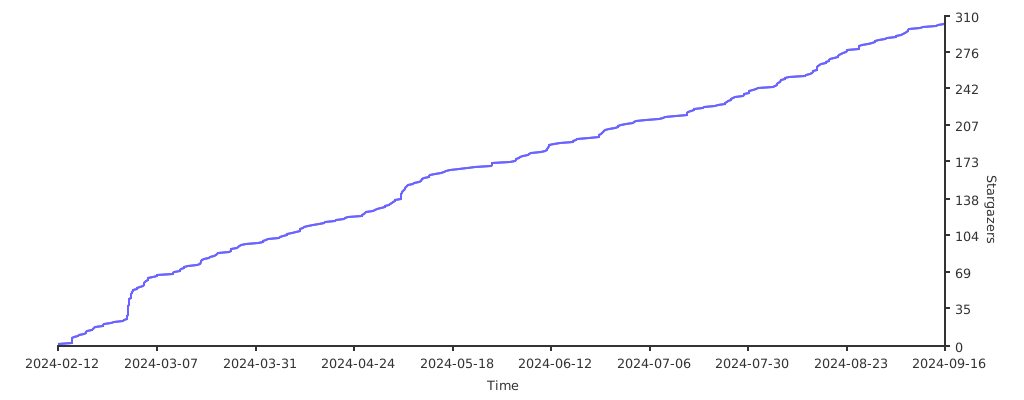
## ⭐️ Stargazers over time
[](https://starchart.cc/OleehyO/TexTeller)
 𝚃𝚎𝚡𝚃𝚎𝚕𝚕𝚎𝚛