
204 lines
8.8 KiB
Markdown
204 lines
8.8 KiB
Markdown
📄 English | <a href="./assets/README_zh.md">中文</a>
|
||
|
||
<div align="center">
|
||
<h1>
|
||
<img src="./assets/fire.svg" width=30, height=30>
|
||
𝚃𝚎𝚡𝚃𝚎𝚕𝚕𝚎𝚛
|
||
<img src="./assets/fire.svg" width=30, height=30>
|
||
</h1>
|
||
<p align="center">
|
||
🤗 <a href="https://huggingface.co/OleehyO/TexTeller"> Hugging Face</a>
|
||
</p>
|
||
<!-- <p align="center">
|
||
<img src="./assets/web_demo.gif" alt="TexTeller_demo" width=800>
|
||
</p> -->
|
||
</div>
|
||
|
||
https://github.com/OleehyO/TexTeller/assets/56267907/b23b2b2e-a663-4abb-b013-bd47238d513b
|
||
|
||
TexTeller is an end-to-end formula recognition model based on ViT, capable of converting images into corresponding LaTeX formulas.
|
||
|
||
TexTeller was trained with ~~550K~~7.5M image-formula pairs (dataset available [here](https://huggingface.co/datasets/OleehyO/latex-formulas)), compared to [LaTeX-OCR](https://github.com/lukas-blecher/LaTeX-OCR) which used a 100K dataset, TexTeller has **stronger generalization abilities** and **higher accuracy**, covering most use cases (**except for scanned images and handwritten formulas**).
|
||
|
||
> ~~We will soon release a TexTeller checkpoint trained on a 7.5M dataset~~
|
||
|
||
## 🔄 Change Log
|
||
|
||
* 📮[2024-03-25] TexTeller 2.0 released! The training data for TexTeller 2.0 has been increased to 7.5M (about **15 times more** than TexTeller 1.0 and also improved in data quality). The trained TexTeller 2.0 demonstrated **superior performance** in the test set, especially in recognizing rare symbols, complex multi-line formulas, and matrices.
|
||
> [There](./assets/test.pdf) are more test images here and a horizontal comparison of recognition models from different companies.
|
||
|
||
* 📮[2024-04-12] Trained a **formula detection model**, thereby enhancing the capability to detect and recognize formulas in entire documents (whole-image inference)!
|
||
|
||
|
||
## 🔑 Prerequisites
|
||
|
||
python=3.10
|
||
|
||
[pytorch](https://pytorch.org/get-started/locally/)
|
||
|
||
> [!WARNING]
|
||
> Only CUDA versions >= 12.0 have been fully tested, so it is recommended to use CUDA version >= 12.0
|
||
|
||
## 🚀 Getting Started
|
||
|
||
1. Clone the repository:
|
||
|
||
```bash
|
||
git clone https://github.com/OleehyO/TexTeller
|
||
```
|
||
|
||
2. [Installing pytorch](https://pytorch.org/get-started/locally/#start-locally)
|
||
|
||
3. Install the project's dependencies:
|
||
|
||
```bash
|
||
pip install -r requirements.txt
|
||
```
|
||
|
||
4. Enter the `TexTeller/src` directory and run the following command in the terminal to start inference:
|
||
|
||
```bash
|
||
python inference.py -img "/path/to/image.{jpg,png}"
|
||
# use -cuda option to enable GPU inference
|
||
#+e.g. python inference.py -img "./img.jpg" -cuda
|
||
```
|
||
|
||
> [!NOTE]
|
||
> The first time you run it, the required checkpoints will be downloaded from Hugging Face
|
||
|
||
## 🌐 Web Demo
|
||
|
||
Go to the `TexTeller/src` directory and run the following command:
|
||
|
||
```bash
|
||
./start_web.sh
|
||
```
|
||
|
||
Enter `http://localhost:8501` in a browser to view the web demo.
|
||
|
||
> [!TIP]
|
||
> You can change the default configuration of `start_web.sh`, for example, to use GPU for inference (e.g. `USE_CUDA=True`) or to increase the number of beams (e.g. `NUM_BEAM=3`) to achieve higher accuracy.
|
||
|
||
> [!NOTE]
|
||
> If you are Windows user, please run the `start_web.bat` file instead.
|
||
|
||
## 🧠 Full Image Inference
|
||
|
||
TexTeller also supports **formula detection and recognition** on full images, allowing for the detection of formulas throughout the image, followed by batch recognition of the formulas.
|
||
|
||
### Download Weights
|
||
|
||
English documentation formula detection [[link](https://huggingface.co/TonyLee1256/texteller_det/resolve/main/rtdetr_r50vd_6x_coco_trained_on_IBEM_en_papers.onnx?download=true)]: Trained on 8272 images from the [IBEM dataset](https://zenodo.org/records/4757865).
|
||
|
||
Chinese documentation formula detection [[link](https://huggingface.co/TonyLee1256/texteller_det/blob/main/rtdetr_r50vd_6x_coco_trained_on_cn_textbook.onnx)]: Trained on 2560 Chinese textbook images (100+ layouts).
|
||
|
||
### Formula Detection
|
||
|
||
Run the following command in the `TexTeller/src` directory:
|
||
|
||
```bash
|
||
python infer_det.py
|
||
```
|
||
|
||
Detects all formulas in the full image, and the results are saved in `TexTeller/src/subimages`.
|
||
|
||
<div align="center">
|
||
<img src="./assets/det_rec.png" width=400>
|
||
</div>
|
||
|
||
### Batch Formula Recognition
|
||
|
||
After **formula detection**, run the following command in the `TexTeller/src` directory:
|
||
|
||
```shell
|
||
rec_infer_from_crop_imgs.py
|
||
```
|
||
|
||
This will use the results of the previous formula detection to perform batch recognition on all cropped formulas, saving the recognition results as txt files in `TexTeller/src/results`.
|
||
|
||
## 📡 API Usage
|
||
|
||
We use [ray serve](https://github.com/ray-project/ray) to provide an API interface for TexTeller, allowing you to integrate TexTeller into your own projects. To start the server, you first need to enter the `TexTeller/src` directory and then run the following command:
|
||
|
||
```bash
|
||
python server.py # default settings
|
||
```
|
||
|
||
You can pass the following arguments to `server.py` to change the server's inference settings (e.g. `python server.py --use_gpu` to enable GPU inference):
|
||
|
||
| Parameter | Description |
|
||
| --- | --- |
|
||
| `-ckpt` | The path to the weights file, *default is TexTeller's pretrained weights*.|
|
||
| `-tknz` | The path to the tokenizer, *default is TexTeller's tokenizer*.|
|
||
| `-port` | The server's service port, *default is 8000*. |
|
||
| `--use_gpu` | Whether to use GPU for inference, *default is CPU*. |
|
||
| `--num_beams` | The number of beams for beam search, *default is 1*. |
|
||
| `--num_replicas` | The number of service replicas to run on the server, *default is 1 replica*. You can use more replicas to achieve greater throughput.|
|
||
| `--ncpu_per_replica` | The number of CPU cores used per service replica, *default is 1*. |
|
||
| `--ngpu_per_replica` | The number of GPUs used per service replica, *default is 1*. You can set this value between 0 and 1 to run multiple service replicas on one GPU to share the GPU, thereby improving GPU utilization. (Note, if --num_replicas is 2, --ngpu_per_replica is 0.7, then 2 GPUs must be available) |
|
||
|
||
> [!NOTE]
|
||
> A client demo can be found at `TexTeller/client/demo.py`, you can refer to `demo.py` to send requests to the server
|
||
|
||
## 🏋️♂️ Training
|
||
|
||
### Dataset
|
||
|
||
We provide an example dataset in the `TexTeller/src/models/ocr_model/train/dataset` directory, you can place your own images in the `images` directory and annotate each image with its corresponding formula in `formulas.jsonl`.
|
||
|
||
After preparing your dataset, you need to **change the `DIR_URL` variable to your own dataset's path** in `.../dataset/loader.py`
|
||
|
||
### Retraining the Tokenizer
|
||
|
||
If you are using a different dataset, you might need to retrain the tokenizer to obtain a different dictionary. After configuring your dataset, you can train your own tokenizer with the following command:
|
||
|
||
1. In `TexTeller/src/models/tokenizer/train.py`, change `new_tokenizer.save_pretrained('./your_dir_name')` to your custom output directory
|
||
> If you want to use a different dictionary size (default is 10k tokens), you need to change the `VOCAB_SIZE` variable in `TexTeller/src/models/globals.py`
|
||
|
||
2. **In the `TexTeller/src` directory**, run the following command:
|
||
|
||
```bash
|
||
python -m models.tokenizer.train
|
||
```
|
||
|
||
### Training the Model
|
||
|
||
To train the model, you need to run the following command in the `TexTeller/src` directory:
|
||
|
||
```bash
|
||
python -m models.ocr_model.train.train
|
||
```
|
||
|
||
You can set your own tokenizer and checkpoint paths in `TexTeller/src/models/ocr_model/train/train.py` (refer to `train.py` for more information). If you are using the same architecture and dictionary as TexTeller, you can also fine-tune TexTeller's default weights with your own dataset.
|
||
|
||
In `TexTeller/src/globals.py` and `TexTeller/src/models/ocr_model/train/train_args.py`, you can change the model's architecture and training hyperparameters.
|
||
|
||
> [!NOTE]
|
||
> Our training scripts use the [Hugging Face Transformers](https://github.com/huggingface/transformers) library, so you can refer to their [documentation](https://huggingface.co/docs/transformers/v4.32.1/main_classes/trainer#transformers.TrainingArguments) for more details and configurations on training parameters.
|
||
|
||
## 🚧 Limitations
|
||
|
||
* Does not support scanned images and PDF document recognition
|
||
|
||
* Does not support handwritten formulas
|
||
|
||
## 📅 Plans
|
||
|
||
- [x] ~~Train the model with a larger dataset (7.5M samples, coming soon)~~
|
||
|
||
- [ ] Recognition of scanned images
|
||
|
||
- [ ] PDF document recognition + Support for English and Chinese scenarios
|
||
|
||
- [ ] Inference acceleration
|
||
|
||
- [ ] ...
|
||
|
||
## 💖 Acknowledgments
|
||
|
||
Thanks to [LaTeX-OCR](https://github.com/lukas-blecher/LaTeX-OCR) which has brought me a lot of inspiration, and [im2latex-100K](https://zenodo.org/records/56198#.V2px0jXT6eA) which enriches our dataset.
|
||
|
||
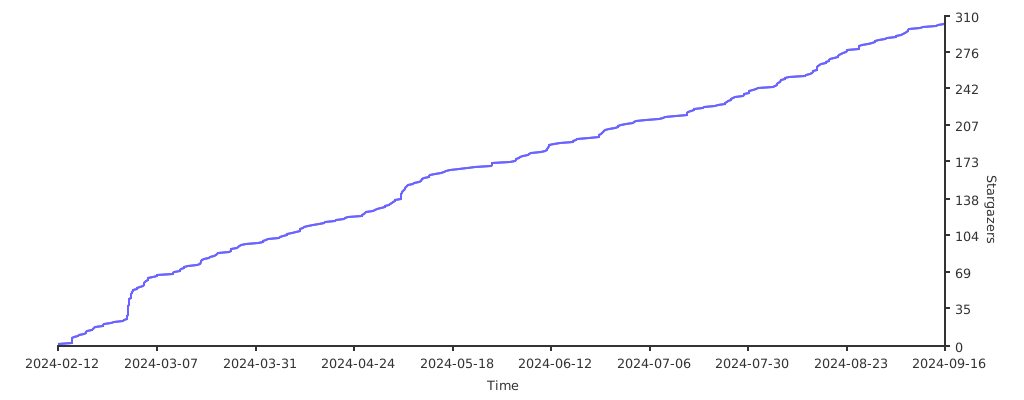
## ⭐️ Stargazers over time
|
||
|
||
[](https://starchart.cc/OleehyO/TexTeller)
|